

The Granola alternative that records without a bot and coaches you live
Try every feature free for 14 days. No credit card needed.
Why teams look for a Granola alternative
Granola is a popular AI notepad, and plenty of people love it. But whether you use it today or you're still deciding, these are the reasons teams go looking for something else.

You can't go back to what was said
Granola keeps the transcript and notes, not the audio. If the transcript gets a name or a number wrong, there's nothing to check it against, and nothing to replay for coaching.
Granola runs in the background on your device, with nothing in the participant list. On video calls it can post a chat message or add a watermark, but on phone and in-person calls, it's up to the rep to remember to ask.
Your notes stay in the notepad
Granola syncs to HubSpot, Attio and Affinity. Salesforce needs Zapier. So teams often pair Granola with a second recorder for customer calls, plus Notion or Google Docs to share notes. That's three places to look for one conversation.
No help when the buyer asks something hard
Granola focuses on your notes after the meeting. It doesn't pop up an answer when a buyer brings up a competitor, or remind you which discovery questions you haven't asked.
If the app doesn't capture it, the call is gone
Granola records only from the app on your device. If it isn't running, or capture stops partway through, there's no backup recording.
Coaching and pipeline reviews still run on memory
Granola's plans don't list call scoring, scorecards or deal insights. Managers still sit in on calls to coach, and pipeline reviews run on what reps report.


What changes with Avoma
The gaps your team experiences with Granola are the very problems Avoma solves.

Go back to any call
Keep the full recording when it matters, or only the transcript and notes when it doesn't.
Everyone knows they're being recorded
One click plays a spoken announcement through your speakers, on video, phone and in-person calls.
Every conversation in one place
Notes and custom fields sync to Salesforce, HubSpot, Zoho, Pipedrive and Copper, with no Zapier and no second recorder.
Help while the buyer is still talking
Answer cards, methodology tracking and Ask Avoma sit right beside your meeting.
No call slips through
Record any call from your menu bar, and let the Avoma bot or cloud recording back up your scheduled ones.
Coach and forecast from every call
Score calls against your own scorecards, and see deal health and risk alerts built from what buyers said.
From the first hello to a better forecast, Avoma covers the whole conversation
Capture every conversation, including the ones you didn't plan
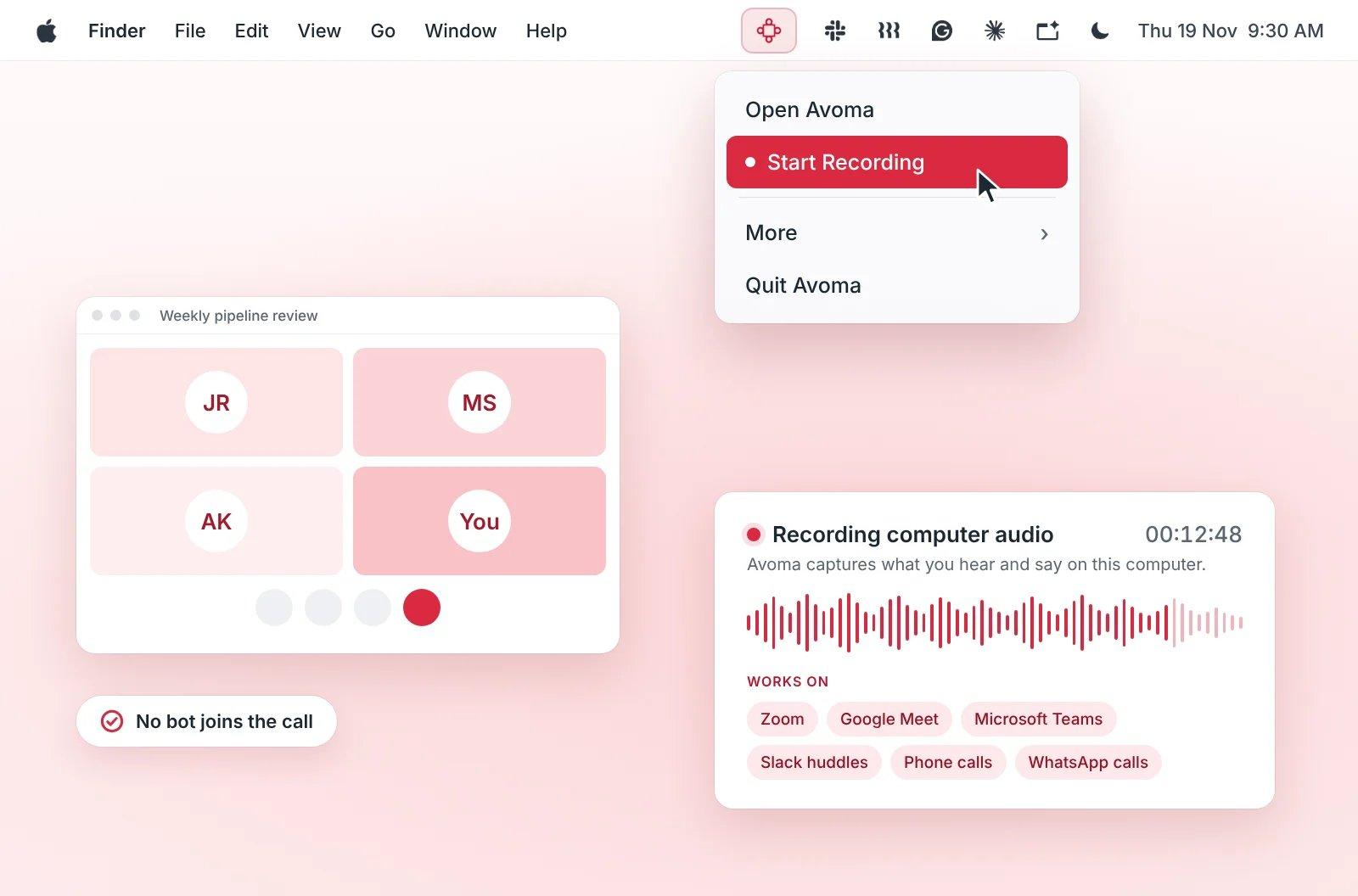
Not every meeting is on the calendar. A buyer calls your phone, a quick chat turns into a real conversation, or you're in a room where a bot would be awkward. Sometimes people just don't want a bot. Click the Avoma icon in your menu bar or system tray and hit Start recording.
- Works on any call: Zoom, Meet, Teams, Slack huddles, phone and WhatsApp
- In person too: use the Avoma mobile app
- Consent built in: play a spoken announcement so everyone hears they're being recorded, even on phone and in-person calls
- Bot when you want one: scheduled calls can still use the Avoma bot or cloud recording
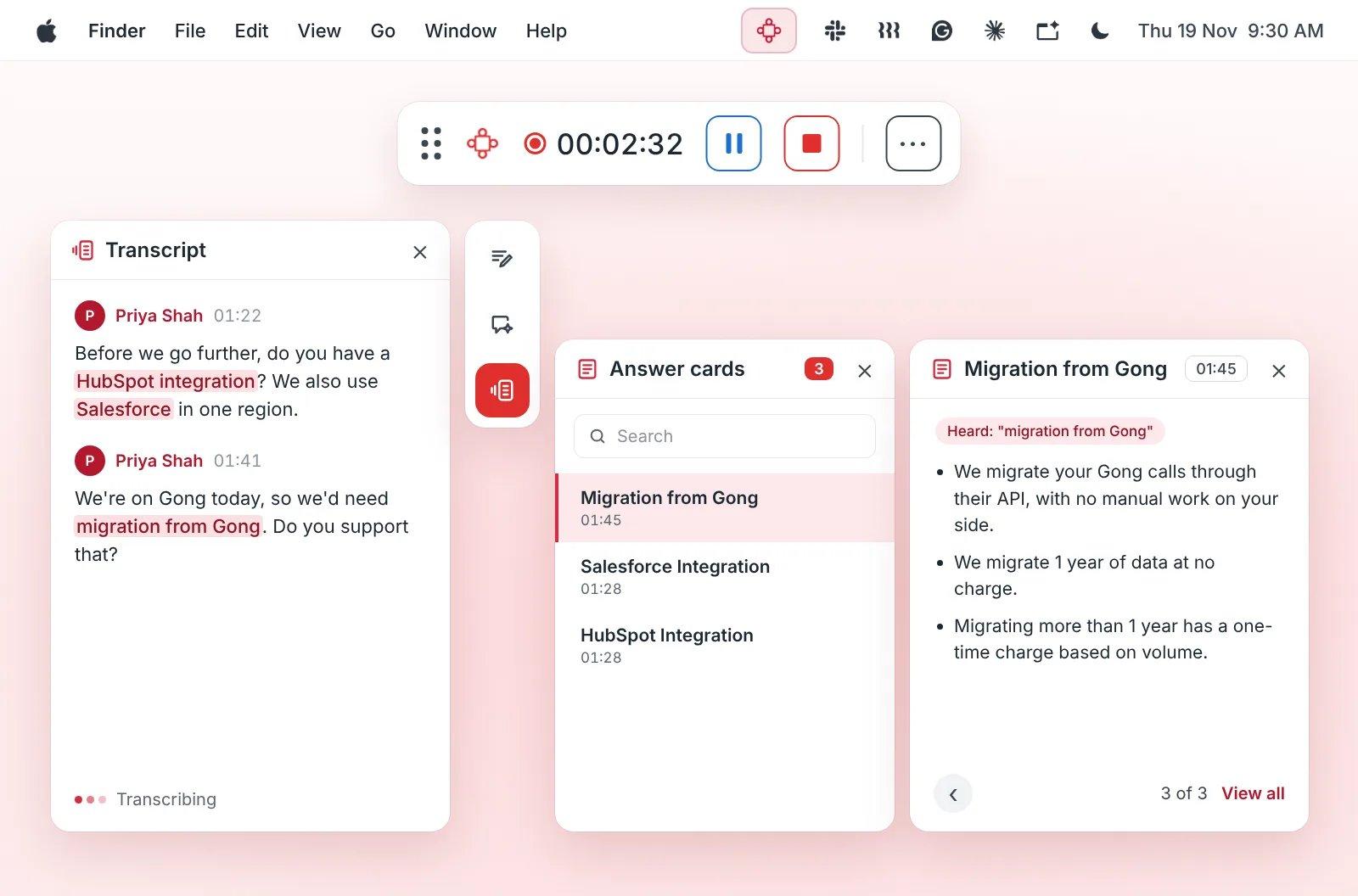
Live notes, answers and coaching while the buyer is still talking
Join late or zone out for a second? It's all there. And when a buyer throws you a curveball, you don't have to say "let me get back to you."
- Live notes: the transcript and AI notes sit beside your meeting. Add your own notes too. Included with every paid seat.
- Answer cards: buyer mentions a competitor, an objection or pricing? The answer you set up pops up.
- Methodology tracking: Avoma follows SPICED, MEDDPICC or your own framework and tells you what to ask next.
- Ask Avoma mid-call: get answers from your team's emails, past calls and CRM data.
Answer cards, methodology tracking and mid-call Ask Avoma (live assist) come with the Conversation Intelligence add-on.
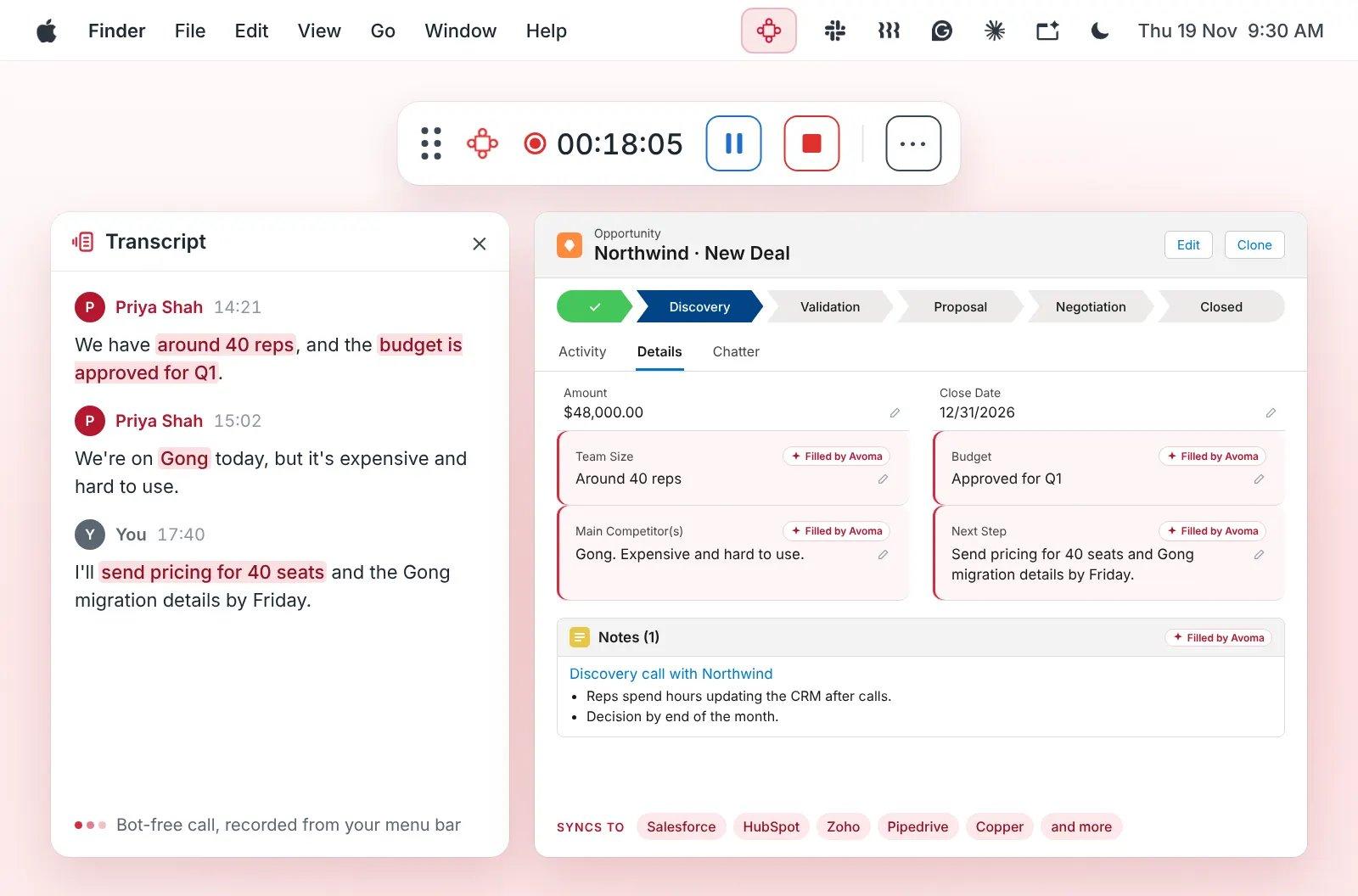
Your recording, transcript and CRM updates, handled when you hang up
- You choose what to keep: save the full recording for playback, or only the transcript and notes
- AI notes and follow-ups: summaries, action items and a follow-up email draft after every call
- Note templates: set a custom template for each meeting type, like discovery, demo or QBR
- CRM updates: notes sync to Salesforce, HubSpot, Zoho, Pipedrive and Copper, no Zapier
- Custom fields filled in: with Revenue Intelligence, Avoma updates your custom CRM fields from what was said, even on bot-free calls
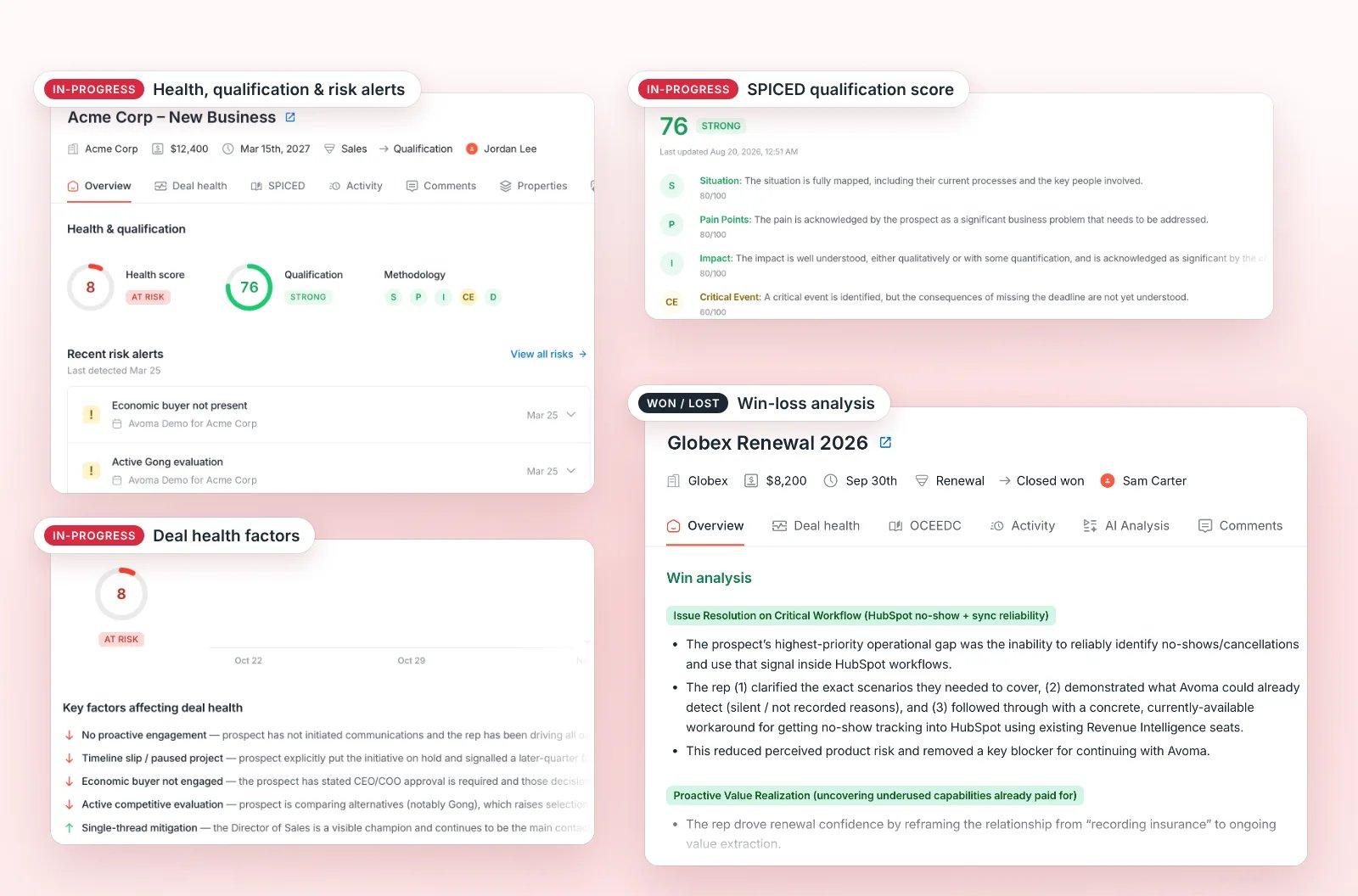
Turn every call into better coaching and a clearer pipeline
- Coaching: score calls against your own scorecards and build playlists of your best calls for new reps
- Qualification: see how well each deal covers your methodology, based on what the buyer said
- Deal insights: deal health, risk alerts, forecasting and win-loss analysis
Coaching comes with Conversation Intelligence. Qualification and deal insights come with Revenue Intelligence.
More than notes, without the enterprise price tag
No credit card needed. Try everything free for 14 days. Start monthly, and add coaching or deal insights only for the people who need them.

Our most popular plan: bot-free recording, live notes, AI notes, CRM sync and scheduling.
Most popular
$29
/user/month, billed annually

Add live coaching, answer cards, methodology tracking and call scoring.
Conversation Intelligence add-on
$29
/user/month, billed annually
The results speak for themselves, so do our customers.


Avoma vs Granola, side by side


Frequently Asked Questions
Is there a Granola alternative for Windows?
Yes. Granola already runs on Windows, so the reason to switch is what happens during and after the call. The Avoma desktop app runs on Windows and records without a bot from the system tray, with the same live notes, live coaching and spoken recording announcement as on Mac. If a rep forgets to open the app, the Avoma bot or the meeting platform's cloud recording can still capture scheduled calls.
Is there a Granola alternative for Android?
Yes. Granola launched its Android app on July 1, 2026. It captures in-person conversations, but video call transcription runs through Granola's Mac and Windows desktop apps, and phone call capture is iOS only. Avoma's Android and iOS apps let users record in-person meetings, review notes and catch up on recordings, including offline playback of downloaded meetings. Online meetings are captured by the Avoma desktop app, the bot or cloud recording, whether or not the user is at their laptop.
How does Avoma compare to Granola on security and compliance?
Both Avoma and Granola are SOC 2 Type II certified, encrypt data at rest and in transit, and host data in the US on AWS. Both offer HIPAA compliance on their Enterprise plans. Avoma also holds ISO/IEC 42001 certification for AI management and supports GDPR with consent notifications and data deletion controls. Granola supports GDPR and provides a data processing agreement on request.
What is the best Granola alternative for enterprise admin controls?
Avoma offers SSO on its Enterprise plan with a minimum of 10 paid seats, while Granola offers SSO for Enterprise workspaces with 50 or more users. Avoma supports SCIM provisioning, zero-day retention and data retention policies. Granola lists SCIM and retention policies on its Enterprise plan. Both can avoid keeping audio: Granola by default, and Avoma when the user saves only the transcript and notes. For recording notices, Avoma plays a spoken announcement on video, phone and in-person calls, while Granola uses a chat message or video watermark on supported meeting apps and has no automatic consent messaging on iPhone.
Is Avoma a good Granola alternative for product teams?
It depends on whether the team needs to hear the customer or only read what they said. For internal standups, planning sessions and design reviews, Granola fits well, and its MCP connector feeds notes into tools many product teams use. Avoma fits product teams that learn from customer calls, because it can keep the full recording. A product manager can replay the moment a customer described a workaround, cut a snippet and add it to a playlist other teams can watch, with viewers needing no paid seat. Snippets and playlists come with the Organization plan.
How much does Avoma cost compared to Granola?
Avoma starts at $19 per recording seat per month billed annually ($29 monthly) on the Startup plan, $29 on Organization and $39 on Enterprise, with a 10-seat minimum. Live coaching and call scoring (Conversation Intelligence) and forecasting (Revenue Intelligence) are $29 per seat per month each, and Lead Router is $19. Granola lists Basic at $0, Business at $14 and Enterprise at $35 per user per month. In Avoma, viewers don't need a paid seat, and add-ons can be assigned to individual team members.
Should I choose Granola or Avoma?
Choose Granola if you take notes for yourself, most of your meetings are internal, and you want a free plan or the lowest price per seat. Granola also has built-in pre-meeting Briefs and an Apple Watch app. Choose Avoma if you run a sales, customer success or RevOps team that wants bot-free recording plus help during the call, with answer cards, methodology tracking and Ask Avoma beside the meeting, and needs every customer call synced to Salesforce or HubSpot, scored for coaching and fed into the forecast. On an Intel Mac, note that Avoma's desktop app supports Apple silicon, and its Intel version is a legacy app that no longer gets new features.
Does Avoma have botless recording?
Yes. Avoma's desktop app records meetings without a bot, also called bot-free or botless recording. Users start recording from the menu bar on Mac or the system tray on Windows, and Avoma captures the computer's audio, so no meeting link or bot is needed. It works on Zoom, Google Meet, Microsoft Teams, Slack huddles, phone and WhatsApp calls, and the Avoma mobile app records in-person meetings. Bot-free calls get the same AI notes and CRM updates as bot recordings.
Do I still need consent if I record without a bot?
Yes. A bot-free recording doesn't change recording consent laws. When you start a local recording with the Avoma desktop app, you're responsible for getting each participant's legally required consent before you begin. Avoma's optional spoken announcement plays through your computer's speakers so everyone on the call hears it, which helps on phone and in-person calls. Laws vary by location, so check with legal counsel.

Ready to get more out of every call?


