
Salesforce vs Pipedrive

Table of Contents:
Pipedrive and Salesforce are two of the better-known SaaS CRM platforms available in 2022.
And while they have many core features in common, they could hardly be more different in terms of what they provide overall and who they’re aimed at.
So which is the right one for your business?
In this blog, we’ll test Pipedrive vs Salesforce and give you all the details…
On G2's "Best Software Products 2026" list, Pipedrive ranks #6 overall among sales software (with strong Ease-of-Use and Pipeline Management scores), while Salesforce's CRM product — now rebranded "Agentforce Sales" following Salesforce's 2025 rename of Sales Cloud — sits at the top of the CRM category. Salesforce's product also now carries the higher average review score: 4.4/5 across 25,000+ G2 reviews, versus Pipedrive's 4.3/5 across roughly 2,900 reviews. That's a reversal from a few years ago, when Pipedrive's simplicity gave it the edge in user satisfaction.

What would make anyone choose the seventh-rated CRM instead of the first? That’s what we’re going to find out!
Our research approach to arriving at an objective comparison
Before getting stuck in, here are a few notes on how we’ve tried to compare Pipedrive vs Salesforce.
At Avoma, we are a SaaS organization ourselves and strongly believe in being useful and helpful to the SaaS community with our Modern SaaS initiative. We’ve gone through the CRM evaluation phase multiple times ourselves.
This blog aims to share the learnings and observations from our evaluation journey and bring in the points of view of other evaluators and customers—past and present—of these two CRM platforms.
Here’s the 7-step process on how we arrive at our comparative information in an unbiased way:
- Schedule a demo with both the CRMs (we had seriously evaluated between them to arrive at the CRM we use internally—and fun fact, Avoma integrates with both, Salesforce and Pipedrive).
- Trial the free version of the software to get a feel of the platform.
- Refer to the notes on why we decided to go through or not-go-through with the platform.
- Reach out to at least 15 existing and past users of both platforms to understand their first-hand experience.
- Interview the current and past users to understand the nitty-gritty of the features that are a must-have, good-to-have, and what’s missing.
- Aggregate a minimum of 100 reviews across G2, GetApp, TrustRadius, FinancesOnline, and all relevant SaaS review sites to understand the customer sentiment at scale.
- Run polls on social media.
The key difference between Pipedrive and Salesforce
Pipedrive vs Salesforce is a tough one. There’s an “apples and oranges” quality to this comparison because the scope of the two products is so different.
Pipedrive—CRM in close-up
Both Pipedrive and Salesforce began as CRM platforms. The big difference between the two is that while Salesforce has continually broadened its offering - with new features, products, and acquisitions - Pipedrive has retained its focus on being a specialized CRM and nothing else.
Of course, Pipedrive does offer a few extra features that are closely related to the sales role of a CRM (for example, email automation), and, increasingly, AI-assisted selling) but the emphasis is very much on managing data, contacts, deals, pipelines, tasks, and calendars in as simple and elegant a way as possible.
This means that Pipedrive has to be so much better than broader alternatives that the advantages outweigh the costs of integrating a standalone CRM into a business’s stack.
And Pipedrive has certainly had a good attempt at this: it’s very easy and intuitive to use; it’s quick to get started with and needs little out-of-the-box configuration; and it has been designed to integrate smoothly with other systems.
This simplicity makes it a great fit for smaller businesses with relatively basic needs, but it’s also capable of handling more demanding tasks, as we’ll see in the rest of this blog.
Takeaway: Pipedrive provides the core features you’d expect from a SaaS CRM in a package that’s customizable, simple to use, and not overburdened with extras. It’s reasonably priced and straightforward to integrate with other software. Great for beginners, startups, and scaling businesses alike!
Salesforce—CRM in sweeping, landscape panorama
Salesforce’s guiding principle has been the opposite of Pipedrive. Starting from the central CRM product, Salesforce’s product range has expanded to cover more and ever more business activities—to the point where, today, it’s entirely possible to run your entire sales, marketing, data, and customer support operations on Salesforce while using a completely different CRM.
In 2025, Salesforce took that expansion further than a new feature or acquisition — it renamed the product itself. At Dreamforce '25, Sales Cloud became "Agentforce Sales," part of a company-wide shift away from the "Cloud" naming convention and toward positioning autonomous AI agents as the core of the platform, formalized in the Spring '26 release. Functionally, it's the same CRM with AI agents built more deeply into the core — but it's a signal of where Salesforce is putting its money and roadmap.
Even Salesforce’s CRM package (Agentforce Sales, formerly Salesforce Sales Cloud) incorporates far more functionality surrounding the core areas than Pipedrive does. And that’s before you begin to look at Salesforce’s all-in-one ecosystem of complementary products, add-ons, and expert support.
The features added at each product tier don’t seem as logically-selected as they are with Pipedrive and pricing is complex.
It almost feels as though Salesforce Sales Cloud has started from its Enterprise package and taken things away to develop the less-expensive ones, whereas Pipedrive has built from the basic Essential package upwards.
Takeaway: Salesforce’s CRM sits at the center of a massive network of related tools, platforms, apps, and more. It has more features and greater customizability than anything else available, but it suffers from complexity and very high pricing. Big businesses will get the most out of it—smaller companies should be wary.
Choosing between Pipedrive and Salesforce
Salesforce’s scope is far greater than Pipedrive—but our attention is primarily on their merits as CRM platforms, and not the full sweep of what each is capable of outside of that space. We’ll be comparing them against these five factors.
Key factors for evaluation
1. Ease of use
If a CRM is hard to use or unintuitive, people won’t use it. So ease of use and adoption are critical factors to consider.
Questions to ask:
- How hard or easy is it to set up and implement Pipedrive and Salesforce?
- Do you need a dedicated manager to administer the platform?
- Can you trial the platform yourself and get to grips with it via self-serve onboarding?
- Will users need dedicated training to start using the tool effectively?
2. Product capabilities
The next front in our Pipedrive vs Salesforce showdown is the CRM’s feature set. What can it do? And what can’t it do?
Questions to ask:
- How comprehensive is the CRM in terms of its features?
- What integrations does Pipedrive support? And Salesforce?
- Do they support integrations natively or via third-party API connectors?
- Are its functionalities out-of-the-box or customizable?
3. Pricing
There are free CRM SaaS products and there are very expensive ones. The one that is right for your business will depend on your team size, budget, and the revenue goals the CRM is aimed at helping you achieve.
Questions to ask:
- Does the CRM offer a free trial or freemium subscription model?
- Is the pricing affordable, flexible, and fair for your business use cases?
- Does it have flexible monthly billing options, or does it force you to sign an annual contract?
- Does the platform charge for collaboration?
- Does the platform offer different pricing for different types of users?
- Are there any hidden costs?
4. Scalability
You shouldn’t be deciding on a CRM system simply based on what you need today. Your choice needs to take into account where your business will be in the future as well.
Questions to ask:
- How easy and affordable is it to add more users to the platform?
- Does it offer enterprise-level features?
- Is it a specialized CRM software or does it offer a wider range of capabilities?
5. Integrations and App Ecosystems
As an extension to scalability, while buying into a CRM, it’s important to understand the tech ecosystem supported by it. This is an area where Pipedrive and Salesforce are both especially strong.
Questions to ask:
- How rich are its integration offerings?
- Does it offer one-way or two-way integration with the tools you want to connect to your CRM?
- Which of these are native integrations, and which of them need a connector (example: Zapier)?
6. AI capabilities
This is the newest and fastest-growing battleground between the two platforms, and one of the most common reasons buyers search for this comparison today.
Questions to ask:
- Does the AI make predictions and recommendations (e.g., lead scoring, deal-risk flags), generate content (emails, summaries), or actually execute multi-step tasks on its own?
- Is the AI included in the price, or does it require a separate add-on or higher tier?
- How much of your own data does the AI need before its recommendations become useful?
Comparing Pipedrive and Salesforce
The TL; DR Version: Pipedrive vs Salesforce
Bottom line: Pipedrive wins on simplicity and price. Salesforce wins on depth, scale, and AI ambition.
1. Ease of use
Pipedrive—Simple user-friendly configuration and UX
Pipedrive is exceptionally easy to configure and use. Even somebody without any real CRM experience can set up an account, begin customizing it to their needs and start to see benefits within a couple of hours.
What initially attracted me to Pipedrive was that it was essentially baby's first CRM tool in terms of user-friendliness. It doesn't have a lot of the bells and whistles you can get from other tools, but that's not always a bad thing when your team is just getting off the ground and learning how to use CRM tools in a smart way.
—Dragos Badea, CEO, Yarooms
By being narrowly focused on doing a few things well, Pipedrive can remain simple and intuitive.
Pipedrive is, without a doubt, the best CRM we've ever used. We've tried many others that were much less user-friendly and much more pricey. Pipedrive appeals to me because of its workflow, automations, and ease of use.
—Alex Haley, Co-founder, YardsNearMe
There is a lot of self-serve material in a well-organized knowledge base to help users through most basic troubleshooting scenarios. Pipedrive also has a well-established community of active users who are happy to discuss issues.

But, one-to-one support is only available via chat and email for the vast majority of users. Only Enterprise customers have access to support over the phone.
Salesforce—Effective setup requires expert knowledge
It was a bit tricky for us to say which offers a simpler UI when we compared Pipedrive with Freshsales because they both compete head-to-head in terms of ease of use. That’s clearly not a confusion here.
In stark contrast to Pipedrive, any attempt to run Salesforce out-of-the-box will quickly grind to a halt. The flip side of Salesforce’s almost limitless configurability is that unless it is streamlined, aligned with your processes, and customized to suit your preferences—it’s kind of a mess.
If you try to configure it yourself, you’ll soon see why there are thousands of people making a good living as expert Salesforce consultants. It requires a comprehensive knowledge of the system and its intricacies to design and execute a setup that maximizes Salesforce’s potential.

Salesforce requires a team of professionals to handle everything. It may require intensive training sessions for employees who haven’t used it before.
Erin Neuman, Be Aligned Web Design
Yes, there are huge amounts of self-serve support material available, a lot of it user-generated through the Trailblazer community.

But expert customer support is limited:
- Essential users are limited to email support.
- Standard email support has a two-day response time (although you can pay extra for “premier success resources”).
- Phone support is a paid extra for Professional and Enterprise users and is only included as standard for Unlimited customers.
As we’ll see later, this has a significant impact on the overall cost of Salesforce relative to other CRMs.
I would classify it as mid to very difficult in terms of setup. This is because the Salesforce software is packed with an abundance of features, and configuring all of them can be time-consuming.
Zephyr Chan, Founder, Better Tools
Of course, once you have set Salesforce up in the perfect way, the UX can be exceptional. And now that Agentforce is built into the core product, there's an added layer of setup: getting an AI agent to act reliably on your data takes at least as much configuration discipline as the CRM itself did. To achieve either, you have a big project—or a big bill—on your hands.
2. Product capabilities
Pipedrive—Core CRM functions, done well
Pipedrive’s strength lies in its simplicity. It does a few things, very well.

The Kanban-style sales pipeline boards are deservedly praised. They’re easy to understand and use, but don’t sacrifice nuance (e.g. alerts to deals that are rotting) for the sake of ease.
Pipedrive’s mobile app is regularly cited as a plus as well. Mobile versions of CRMs can be horrible to use thanks to the small screen size, but Pipedrive has built theirs very well.

Pipedrive is no longer quite as feature-light as it once was — it's built out a genuine AI layer over the last couple of years, branded Pipedrive AI. It now includes an AI Assistant that suggests next steps and flags at-risk deals, AI-generated email and note drafting, automatic lead enrichment from public data, and an Insights AI feature that turns a plain-language prompt into a ready-made report. Pipedrive groups these under a growing "Pulse, Agentic AI, and Insights AI" toolkit, though some capabilities are still in beta and gated to specific plans.
It also excels in managing documents (proposals, contracts, etc.) alongside contact and company data. It offers:
- Trackable smart document sending
- Notifications when proposals have been opened
- E-signatures
- Integration with Google Drive and OneDrive
These are great additions that will help any sales agent close more deals.
Salesforce—Everything Pipedrive does and much more, now wrapped in an AI-agent layer
Where to begin?
Salesforce's CRM (Agentforce Sales) list of features is massive.

It can do everything that Pipedrive does, albeit not always as easily and not always at a comparable price point. Plus, it has a host of features that Pipedrive lacks:
- Configure, price, quote functionality
- Einstein AI for predictive scoring, forecasting, and next-best-action recommendations, plus Agentforce autonomous AI agents that can execute multi-step tasks (like qualifying a lead or drafting a full follow-up sequence) rather than just recommending one
- Internal chat platform 'Chatter' (also being folded into the Agentforce/Slack ecosystem)
- Toolkit for building no-code apps (Lightning App Builder)
- Multiple developer sandboxes
- Lead registration and sharing
Not only that, it can be configured so as to meet the needs of almost any vertical—with custom dashboards, complex automations, deal, task, and contact management, and tailored sales processes.

What I like most about Salesforce is that it is extremely customizable. This is one factor that is essential for a CRM, and Salesforce is the best for it.
- Sonia Navarro, Founder, Navarro Paving
While that may be overwhelming for some businesses, it’s possible to remove unwanted features during the configuration process, so that users aren’t left looking at more functionality than they can get their heads around. You’ll still have to pay for it, but at least it won’t be staring you in the face and confusing you.
AI capabilities, head to head
The distinction that matters most: Einstein is largely predictive and generative — it scores leads, forecasts pipeline, and drafts text for a human to review and send. Agentforce goes further, acting as an autonomous "digital worker" that can execute an end-to-end process on its own, using Salesforce's Data Cloud to pull in both structured CRM data and unstructured data like emails and PDFs. Pipedrive AI, by contrast, is still primarily an assistant layer on top of a simpler data model — strong for drafting, summarizing, and flagging things a rep should look at, but not positioned as an autonomous agent platform.
In practice: if you want AI that quietly makes your reps faster inside a simple CRM, Pipedrive's AI toolkit does that well and is included at lower price points. If you want AI that can independently run a defined process across a complex, multi-department data set, that's the case Salesforce is explicitly building Agentforce for — and you'll pay Salesforce's top-tier pricing to get it.
3. Pricing
Pipedrive—Good value, clear product tiers—except for Enterprise
Pipedrive offers a 14-day free trial of all its features, which is a great introduction—although you’ll need to be well-prepared to make the most of it.
Nevertheless, it’s usually going to be long enough to let you know which package is right for your business.
Why?
Because—unlike other bigger players like HubSpot who have confusing pricing plans—the difference between Pipedrive’s product tiers is very clear and very much feature-led:
(Monthly billing is available on every tier, typically at a premium of roughly 20-25% over the annual rate.)
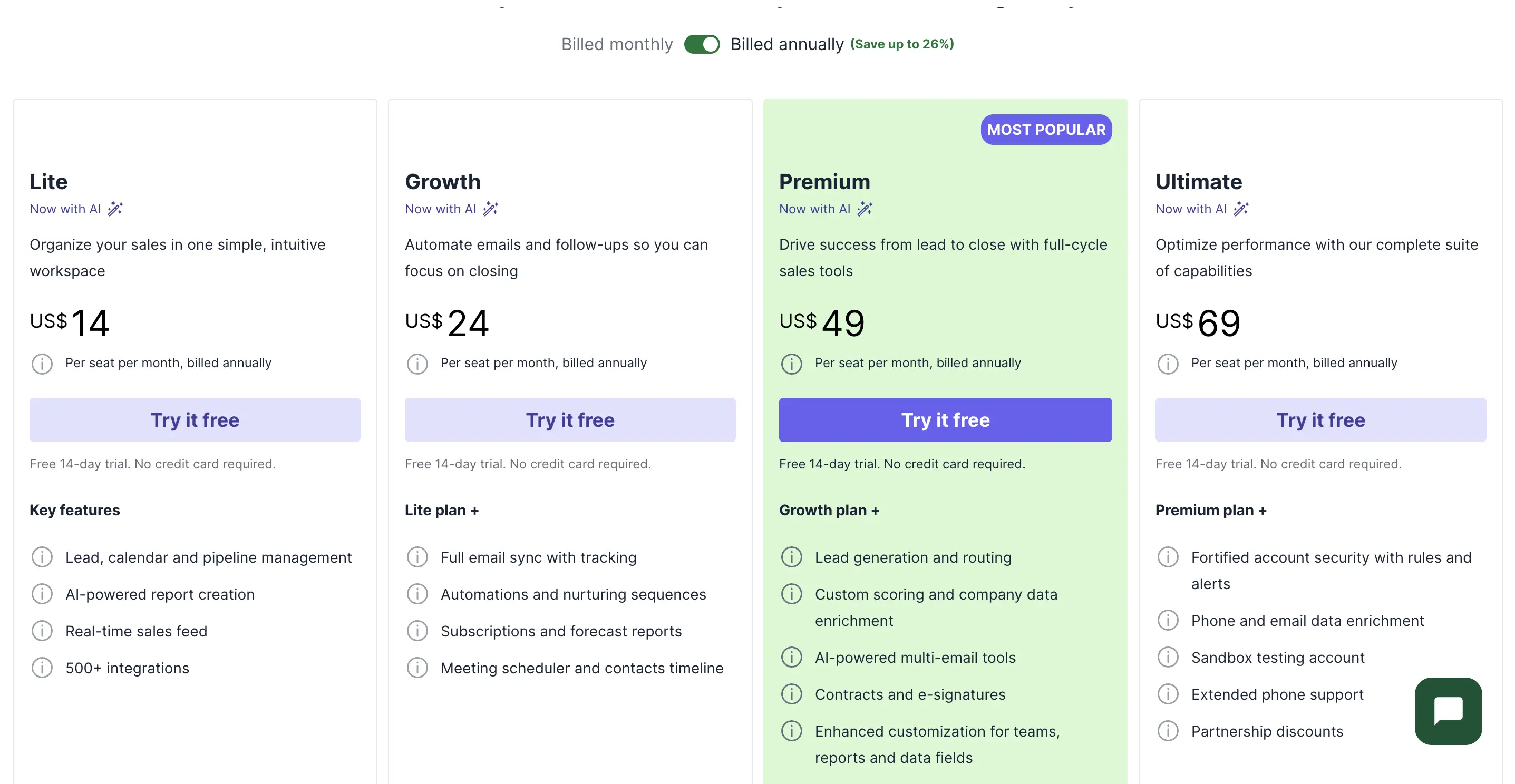
The price increases between tiers are not too steep and you can certainly "see where the money goes" in terms of extra features. Premium and Ultimate now bundle several of Pipedrive's paid add-ons (like LeadBooster and Smart Docs) into the price, which softens the jump some users used to complain about at the top of the range.
It’s still a lot cheaper than the equivalent Salesforce package, but there is rather a lack of compelling reasons to upgrade from Professional to Enterprise.
Salesforce—Even more expensive than it looks
Salesforce provides a 30-day free trial that puts its full range of capabilities on display.
It’s a great showcase, but getting the best out of Salesforce requires extensive customization. And even if you’re already an expert, migrating your data and calibrating it within 30 days to get a real sense of how effective Salesforce can be is going to be a challenge.
Once your trial is over, Salesforce needs customers to commit to at least a year. Here's the current tier structure:
(Salesforce raised list prices roughly 6% on Enterprise and Unlimited in August 2025, so expect these numbers to keep climbing — always verify current pricing directly with Salesforce before budgeting.)
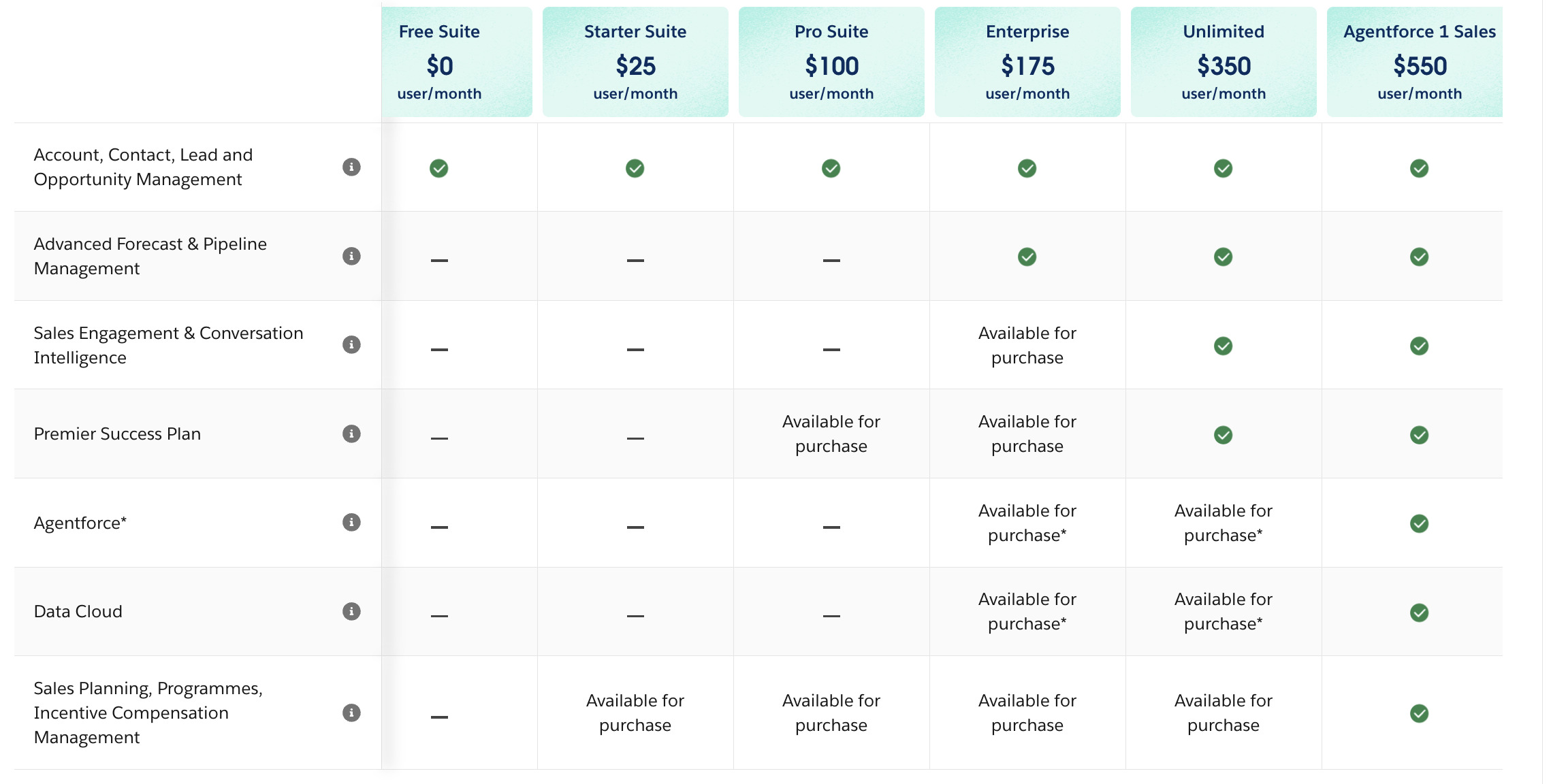
The price jumps between tiers are eye-watering, and they don’t even tell the full story.
You will almost certainly end up paying extra to make the most of Salesforce:
- There's no getting away from it. Salesforce is expensive, and reviewers still call out cost as the single most common complaint in 2026 G2 reviews, especially once add-ons and implementation are factored in.
- For apps, components, and data solutions from the AgentExchange (Salesforce's marketplace, recently merged with the former AppExchange and Slack Marketplace) to customize and enhance the basic platform to meet your needs
For a specialist consultant to come in, design, and implement your ideal setup — this kind of engagement typically starts in the low thousands of dollars and scales up quickly with scope
4. Scalability
Pipedrive—Great for startups and scale-ups
Pipedrive scales best at the smaller end of the business spectrum. The price increases between packages are reasonable, each additional user costs the same, and with monthly billing options, the upfront cost of expansion is minimal.
Of course, Pipedrive is only aspiring to fulfill your business’s CRM needs, so its ambitions are far less expansive than Salesforce’s.
In that sense, as you scale you will need more and more solutions alongside Pipedrive—and you’ll need to integrate it with them to get the most of your CRM data. As we’ll see, Salesforce’s product suite is so wide that it can meet almost any business’s every need.
And as we’ve already mentioned, as an enterprise-level product Pipedrive’s offering is a little disappointing.
While we appreciate their single-minded focus on the CRM function, as companies get bigger, they typically want more functionality under a single roof rather than needing to re-integrate the CRM each time the stack expands.
Salesforce—Ideal for enterprises and above
Salesforce is at its best when it’s delivering highly bespoke, tailored solutions for large enterprises. At that point, the efficiency gains it can offer compared to something more generic start to justify the high cost and high learning curve.
Salesforce’s CRM product is sold as part of its Sales Cloud—one of four core packages alongside Service, Marketing, and Commerce Clouds (all now carrying "Agentforce" branding of their own). There is a degree of overlap between each one, making it more efficient to use two than one, three than two, and so on.
If you want a single tech platform on which to run all of your operations, Salesforce offers state-of-the-art solutions and experts who can implement them for you off the peg.
But for small and medium-sized businesses, the price, the setup challenges, and the surplus of unnecessary features are likely to steer their choices towards cheaper, simpler products.
Salesforce is great if your business is already an enterprise. It’s a lot less attractive to everyone else, who can get what they need for a fraction of the price elsewhere.
5. Integrations and App Ecosystems
Pipedrive—A comprehensive marketplace of apps and integrations
Like many CRM platforms, Pipedrive has built up its own ecosystem of apps, made available in its marketplace.

As of 2026, estimates put Pipedrive's Marketplace at roughly 400-460+ integrations, extensions, and apps to leverage the data in your Pipedrive CRM by making it interoperable with other solutions (and vice versa).
One of them is an integration with Avoma. Avoma uses AI to generate summaries of voice calls and meetings with action points. By feeding this insight directly into Pipedrive, Avoma’s integration means that sales agents no longer need to spend countless hours after a meeting typing notes into the CRM.
The marketplace also includes multiple connectors, like Zapier, that enable you to build out your own basic two-way integrations.
And for users who need something more complex, Pipedrive has a RESTful API that allows developers to build both public and private apps and integrations.
Salesforce—A universe in its own right, now rebranded AgentExchange
Salesforce merged its long-running AppExchange marketplace with the Slack Marketplace and its Agentforce ecosystem into a single storefront called AgentExchange. Estimates for the combined listing count vary by source — recent figures range from roughly 6,000 apps (AppExchange listings alone) up to 10,000+ once pre-built agents and Slack apps are included.

Of course, a lot of those are for use with Salesforce products other than the core CRM.
It also brings back hundreds of consultants who can help you get set up—for a price.
It’s not really fair to call some of these apps mere “extensions”. Many are practically products in their own right.
Take AscendixRE CRM, for example. It converts Salesforce into a dedicated commercial real estate CRM for $79 per user per month—on top of the Salesforce subscription:

And as for APIs…

Salesforce is a universe in itself. But it’s so complex and so extensive that you need almost as much training, expertise, and experience to navigate inside the ecosystem as you would to achieve the same results coding solutions outside of it.
6. AI capabilities
Both vendors have made AI central to their pitch, but they're solving different problems:
Takeaway: if AI-assisted selling for a lean team is the goal, Pipedrive's AI is included well below Salesforce's price floor. If the goal is autonomous agents running whole workflows across a large, complex data estate, that's squarely Salesforce's bet with Agentforce — and it's priced accordingly.
Final verdict
Here's how G2 users rate Pipedrive and Salesforce (worth re-checking on G2 directly, since these move over time):
That gives Salesforce a slightly higher average rating today, but Pipedrive a clear edge on ease of use — a flip from where these two stood a few years ago, when Pipedrive led on both overall satisfaction and simplicity.
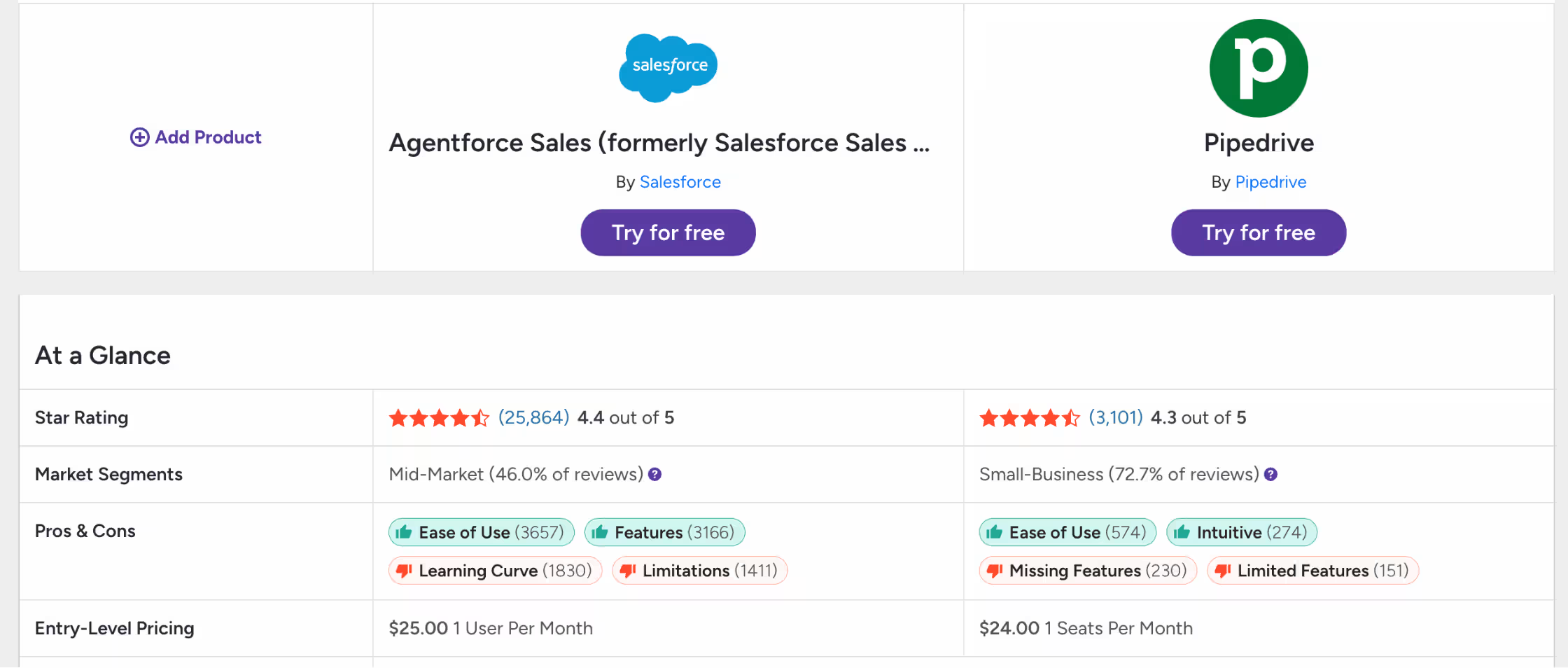
But don't forget: reviewers don't rate against some objective, consistent standard. They measure a product against how well it fulfills their needs. Ratings shouldn't be taken as meaning the two products' capabilities are more or less equal — these are ratings relative to whatever customers expect or need in a product, and users expect a totally different set of features when they buy Salesforce compared to when they choose Pipedrive.
Yes, they're both CRM platforms, but if you opt for Pipedrive, you're choosing a "point solution" (as Salesforce puts it): Pipedrive tries to solve the CRM question exclusively.
Apart from making it easy to integrate with the rest of your business via apps and the API, Pipedrive doesn't really address business concerns far beyond that.
Salesforce does. It aspires to be the platform that leverages the value of your CRM data — increasingly through autonomous AI agents — in every corner of your business.
So, here are our conclusions:
- Pipedrive is excellent value for money as a powerful, yet simple CRM "point solution." If you're looking for a highly-visual, customizable way of tracking deals, contacts, calendars, and (above all) sales pipelines, with AI assistance included at a reasonable price, it's ideal.
- Salesforce is expensive and over-complicated but taken purely as a CRM it has the widest range of features and the greatest degree of customizability on the market, plus the most ambitious AI agent roadmap of the two. Combine that with an all-encompassing ecosystem of apps and complementary products, and for enterprises prepared to put up with its drawbacks, Salesforce is hard to beat.
- Enterprises looking to run their operations on a single, AI-agent-driven platform should definitely consider Salesforce. Smaller businesses or those that prefer point solutions would be better off choosing Pipedrive.
Frequently Asked Questions
It depends on your size and needs, not a universal ranking. Salesforce currently has the higher average G2 rating (4.4 vs. 4.3) and the deeper feature set, especially for AI and enterprise-scale customization. Pipedrive rates higher on ease of use and costs a fraction of the price. For a small or mid-size sales team that wants to be productive on day one, Pipedrive is usually the better fit. For an enterprise that needs to unify sales, service, and marketing data under one AI-driven platform and has the budget and admin resources to run it, Salesforce is usually the better fit.
Pipedrive is a purpose-built CRM: it focuses on pipeline, contact, and deal management and does that job with minimal setup. Salesforce is a broader platform where the CRM is one module inside a much larger ecosystem of sales, service, marketing, and commerce products, plus (as of 2025-26) an autonomous AI agent layer (Agentforce) built across all of them.
At the entry level, Salesforce's Starter Suite ($25/user/mo) is close to Pipedrive's mid-tier Growth plan ($39/user/mo). But Salesforce's pricing accelerates much faster at higher tiers — Enterprise and Unlimited run $175 and $350/user/mo, and the AI-agent-enabled Agentforce 1 Sales tier runs $550/user/mo, versus Pipedrive's top Ultimate tier at $99/user/mo. Add Salesforce's typical consultant and implementation costs, and total cost of ownership is usually several times higher than Pipedrive's at any comparable feature depth.
It can be. Complexity is the most consistent criticism in Salesforce reviews: the platform rewards businesses that can dedicate an admin or consultant to configuring it, and punishes those that try to run it out of the box. Salesforce's own Starter Suite and Pro Suite tiers exist specifically to address this complaint for smaller teams, but even those still require more setup than Pipedrive does.
Most startups are better served starting with a simpler, cheaper CRM like Pipedrive and migrating to Salesforce later if and when their process complexity and headcount genuinely require it. Migrating a CRM is disruptive — it's usually cheaper to grow into Salesforce than to over-buy it early and pay for capacity you don't yet need.
Both directions are common. Moving from Salesforce to Pipedrive typically means simplifying — exporting contacts, deals, and pipeline stages, then rebuilding automations in Pipedrive's simpler workflow builder (expect to leave some of Salesforce's more bespoke logic behind). Moving from Pipedrive to Salesforce typically means expanding — mapping Pipedrive's flatter data model onto Salesforce's more granular object structure, which is where a Salesforce consultant is usually worth the cost. Either way, budget time for data cleanup before migration, not just during it.


Dive into Our Latest
Avoma Insights.




What's stopping you from turning every conversation into actionable insights?


