
Can Claude or ChatGPT replace purpose-built AI software for revenue teams?

Table of Contents:

A sales leader wants to build call coaching workflows in Claude. Another company plans to recreate revenue intelligence with HubSpot and AI agents. A third asks why it needs specialized meeting software when Microsoft Copilot is already in its stack.
These are real buyer conversations.
In an internal review of about 55 Avoma prospect calls, 21 accounts discussed building their own AI capabilities. 14 asked whether bundled AI was enough, and 17 described using Claude or ChatGPT to analyze conversations by hand.
If you run RevOps or lead a sales team, you've heard the question. If Claude, ChatGPT, or Copilot can do much of what specialized software does, why pay for another application?
Below, you'll see where DIY AI workflows get complicated once a team depends on them, and what buying purpose-built software takes off your plate. You'll also get a 4-part test for your own workflow and a framework for choosing to build, buy, or combine both.
TL;DR
- Claude, ChatGPT, and Copilot can summarize calls, score them, flag deal risks, and draft CRM updates when they can reach the right data.
- DIY AI workflows hold up for 1 or 2 people. At team scale, manual copying piles up, scoring drifts between managers, findings stay in private chats, and the workflow leaves when its builder does.
- Shadow AI adds a data risk. Pasted transcripts leave approved tools and lose their permissions, so a private meeting can reach the wrong people.
- The 4C scale test (Context, Consistency, Control, Continuity) is a quick check for whether a personal AI workflow can support a team.
- Buying purpose-built software moves most of that work to the vendor. Your team still owns setup, like recording rules and a shared scorecard.
- Many teams pick a hybrid: purpose-built software for shared conversation data, plus their own AI tools and systems connected through MCP or APIs.
- Avoma fits the buy and hybrid approaches. Teams buy it for ready-made workflows and Ask Avoma, and hybrid teams extend it with their own AI or code through MCP and its API.
Can general-purpose AI replace revenue intelligence software?
General-purpose AI (Claude, ChatGPT, Microsoft Copilot) can replace parts of revenue intelligence software for individuals and small, well-defined workflows.
Purpose-built software captures meetings, links them to CRM records, and runs recurring workflows like call scoring and deal inspection for a whole team. Replacing that across an organization takes building work and ongoing maintenance.
The right choice depends on what you need to accomplish, how many people depend on it, and what you're willing to build and maintain.
Why revenue teams are reconsidering specialized AI software
3 shifts are changing how companies evaluate AI software for sales and customer success.
1. Teams can build more with general-purpose AI
With Claude, ChatGPT, APIs, and AI agents, teams can create workflows that used to need a dedicated application.
A sales manager can evaluate calls against MEDDICC. RevOps can scan CRM data for qualification gaps. Customer success can pull recurring complaints out of transcripts.
Some buyers now ask vendors for the underlying data so they can build the analysis themselves.
2. Many companies already pay for AI
Microsoft 365, Google Workspace, Zoom, and HubSpot plans may already include AI meeting notes and summaries.
If a team needs summaries and the occasional follow-up draft, those tools are probably enough.
The evaluation changes when it needs consistent coaching, analysis across meetings, CRM workflows, or revenue reporting.
3. Employees already use AI on their own
Reps paste transcripts into ChatGPT to write follow-ups. Managers upload recordings to Claude for coaching. Others keep custom GPTs for analyzing calls.
These workflows save time.
But when everyone works in a separate AI environment, the organization loses sight of what employees learn from customers.
That gap, and the shadow AI risk that comes with it, is covered later in this guide.
What Claude, ChatGPT, and Copilot can already do
General-purpose AI can handle these revenue workflows when it can reach the right data.
| Revenue workflow | What general-purpose AI can do |
|---|---|
| Meeting follow-ups | Summarize transcripts, draft emails, extract commitments |
| Sales coaching | Evaluate calls against a framework and recommend improvements |
| Deal inspection | Identify missing stakeholders, objections, and qualification gaps |
| CRM automation | Draft updates, create tasks, and take permitted actions through integrations |
| Forecast preparation | Analyze pipeline information and flag inconsistencies |
| Win-loss analysis | Categorize reasons for wins and losses across conversations |
| Customer success | Spot concerns, feature requests, and expansion signals |
A sales manager reviewing 5 calls can get everything they need from a well-written Claude prompt.
The case for general-purpose AI gets stronger when the requirement is specific, the data is accessible, and someone reviews the results.
Pro Tip: Run the workflow in Claude or ChatGPT with a small group for 2 weeks before you buy or build. Write down every step you repeat by hand, like pasting transcripts or copying results into the CRM. That list becomes your requirements doc.
Purpose-built software starts to matter once a workflow leaves one person's laptop, which is where DIY workflows get complicated.
Where DIY AI workflows get complicated
DIY AI workflows get complicated when they move from one person to a whole team.
Here's how the spread happens. A sales manager writes a Claude prompt that checks whether reps identified the economic buyer, explored business pain, and agreed on next steps.
It works, so other team leads adopt it. Soon 50 reps depend on it. The drawbacks show up in the order the workflow runs: getting calls in, analyzing them, acting on results, protecting the data, and keeping it running.
1. Manual work grows with every rep
For 1 or 2 people, the manual routine works. You download a transcript, paste it into Claude, run the prompt, and copy the result into notes or the CRM.
With 50 reps on 5 calls a week each, that's 250 transcripts to download, paste, prompt, and copy back every week before anyone acts on the results.
Each manual step is a place for the workflow to slip. Someone pastes the wrong call, skips a busy week, or runs last month's version of the prompt.
2. The AI misses the full deal history
The latest call may sound positive while earlier ones show unresolved objections, missing stakeholders, or a close date that keeps moving.
General-purpose AI can pull that history through connectors, APIs, and MCP servers. Someone on your team has to configure the connections, match records, and manage permissions.
3. Every manager scores calls their own way
One manager's prompt weights qualification. Another's focuses on objection handling. A third changes the criteria mid-quarter.
Each gets useful feedback, and leadership loses the ability to compare reps across teams.
4. Deal risks don't reach the people who need to act
An AI agent flags that a $150,000 opportunity may slip because procurement hasn't started.
The AE has to act, the manager needs to see it in pipeline review, and the CRM may need an update.
With a chat-based workflow, someone has to copy the risk into the CRM, flag it to the manager, and create the follow-up task by hand.
A custom agent can handle these steps once someone writes rules for permissions, record matching, approvals, and failed actions.
5. Shadow AI puts private meetings in the wrong hands
Shadow AI is the use of AI tools, accounts, or workflows outside an organization's approved oversight.
It's common: In an August 2025 Cybernews survey of 1,003 employed US adults, 59% said they use AI tools for work that their employer hasn't approved.
About three-quarters of that group said they may have shared sensitive information, such as customer data or internal documents, with those tools.
For revenue teams, shadow AI creates 4 separate risks:
- Data leaves approved tools: A rep who uploads a transcript to a personal AI account may be sharing pricing or contract terms. The organization can't tell where that data went or which policies apply.
- Permissions stay behind: Your recording tool may mark a 1:1, a performance review, or a pricing negotiation as private. Once someone copies that transcript into a chat, that setting no longer applies.
- Shared workspaces spread private calls: A manager uploads a folder of transcripts to a team Claude Project or custom GPT and includes a private conversation by mistake. Everyone with access can now ask questions about it.
- Copies outlive deletion: Deleting a recording in your meeting tool doesn't delete the pasted versions sitting in chat histories and project files.
Company-approved Claude, ChatGPT, or Copilot accounts with usage rules lower the risk. From there, the provider's terms and your agreement with it govern retention and use.
6. Patterns across calls and teams stay hidden
Sales leaders need answers that no single call analysis gives them: which qualification gaps come up most, whether coaching scores are improving, and why deals are lost.
That takes historical data, consistent definitions, and reporting. You can build it on a data platform, and then you maintain it for as long as you need the answers.
With DIY workflows, the raw material for those answers is scattered across personal chats. Say a competitor comes up in 3 of one rep's ChatGPT chats, 4 of a CSM's Claude conversations, and a few of a manager's Copilot notes.
Each person sees a handful of mentions, and no one sees that it's the most common objection of the quarter. The organization keeps losing customer knowledge it already has.
7. The workflow leaves with the person who built it
Most homegrown workflows start with one person. They write the prompt, build a Claude Project or custom GPT around it, and end up the only one who knows how it works.
When that person leaves, the prompt and project files may sit in their account, depending on the plan and sharing settings.
The team that inherits the workflow often can't tell which prompt version scored last quarter's calls, so the coaching history starts over.
8. Running it costs more than building it
Building an AI workflow takes less time than building traditional software. Operating it for months or years is a different job.
A homegrown build that solves these problems means maintaining:
- Meeting and CRM integrations
- Authentication and user permissions
- Prompts, evaluation rules, and agent instructions
- Data storage and historical reporting
- Workflow triggers and error handling
- Testing when models or APIs change
- Monitoring, support, and security controls
Then add AI usage, infrastructure, and engineering time.
These costs came up in Avoma's prospect conversations.
One company said maintaining integrations had become a problem for its internal AI platform. Another dropped plans to build with Claude because of the time and money involved. A third hit accuracy issues analyzing recordings through an AI integration.
For a small workflow, building can make financial sense. For a process hundreds of employees use, maintenance becomes a standing commitment.
The 4C scale test: a quick check for your workflow
Most of these drawbacks fall into 4 areas, which make up the 4C scale test: Context, Consistency, Control, and Continuity. Use it to check whether a personal AI workflow can support your team.
| 4C test | Question to ask | What team scale needs |
|---|---|---|
| Context | Does the AI see the full deal history? | Meetings linked to CRM, account, and prior commitments |
| Consistency | Is everyone scored on the same criteria? | Shared scorecards and definitions |
| Control | Who can see the data, and where do findings land? | Access that follows meeting permissions, record matching, approvals, error handling |
| Continuity | Do trends and history survive turnover? | Stored results and reporting across quarters, owned by the organization |
Key Takeaway: A workflow that fails 1 of these tests can still serve an individual. Treat 2 or more failures as a sign you've started building a product, with everything a product needs to keep running.
Before you approve a homegrown workflow, name 2 people: who fixes it when a model update changes its output or a CRM field gets renamed, and who takes over when the owner leaves.
Purpose-built software is designed to close these gaps, covered next.
What buying purpose-built software takes off your plate
Buying purpose-built conversation intelligence software moves most of these jobs to the vendor. Your team still owns setup and a few decisions, and the table shows where that line tends to fall.
| DIY challenge | What purpose-built software handles | What your team still owns |
|---|---|---|
| Manual copy-and-paste | Records, transcribes, and summarizes meetings based on admin rules | Recording and consent settings |
| Missing deal history | Links meetings to CRM accounts and opportunities | CRM data quality and matching rules |
| Inconsistent scoring | Stores shared scorecards and scores calls against them | Agreeing on one scorecard per team or process |
| Risks that stall | Shows deal risks in shared deal views, and some tools send alerts | Deciding who acts on which risks |
| Shadow AI exposure | Keeps recordings in one approved system with access controls | Policies for approved integrations and external AI tools |
| Hidden patterns | Stores scores and conversation data for reporting over time | Choosing the topics and reports that matter |
| Builder turnover | Keeps scorecards, templates, and history in the company account | Admin ownership of the setup |
| Ongoing upkeep | Maintains supported integrations, AI models, and security | Configuration and adoption |
If you also need analysis no vendor ships, you can combine both approaches, covered next.
Build, buy, or bring your own AI?
Revenue teams have 3 reasonable approaches, and each shifts different responsibilities onto your team.
| Approach | Choose it if | You own |
|---|---|---|
| Build with general-purpose AI | You have specialized requirements, want to experiment, or have staff to maintain custom workflows | Instructions, integrations, business logic, and every operational responsibility |
| Buy purpose-built software | You need established workflows across many employees: meeting capture, coaching, CRM sync, deal inspection, forecasting, reporting | Configuration, adoption, and governance, while the vendor maintains the product |
| Bring your own AI to purpose-built software | You want shared data and recurring workflows, plus custom analysis in your preferred AI tool | Custom prompts on a shared data layer, and governance of the AI tools you connect |
With the hybrid, your team builds only the custom analysis and leaves capture, scoring, and CRM sync to the platform.
How Avoma fits the buy and hybrid approaches
Teams use Avoma in 5 ways across the buy and hybrid approaches.
1. Use ready-made revenue workflows
Avoma runs the core revenue workflows out of the box. They follow a deal from the first booked meeting to the forecast.
Book and record meetings
Scheduling pages and round-robin routing book meetings with the right rep.
Avoma records and transcribes meetings on Zoom, Google Meet, Microsoft Teams, and Webex, then writes notes and action items. Which meetings it records depends on your recording and consent settings.
Keep the CRM current
Avoma links meeting conversations to supported CRM records in Salesforce, HubSpot, and other CRMs, so each opportunity carries its conversation history.
It can also create contacts from meeting attendees and write fields like qualification scores back to the CRM.

Score calls and coach reps
Teams build custom scorecards with weighted criteria, and automated scoring returns scores with reasoning and timestamps tied to call moments. Scores compare across teams that use the same scorecard.
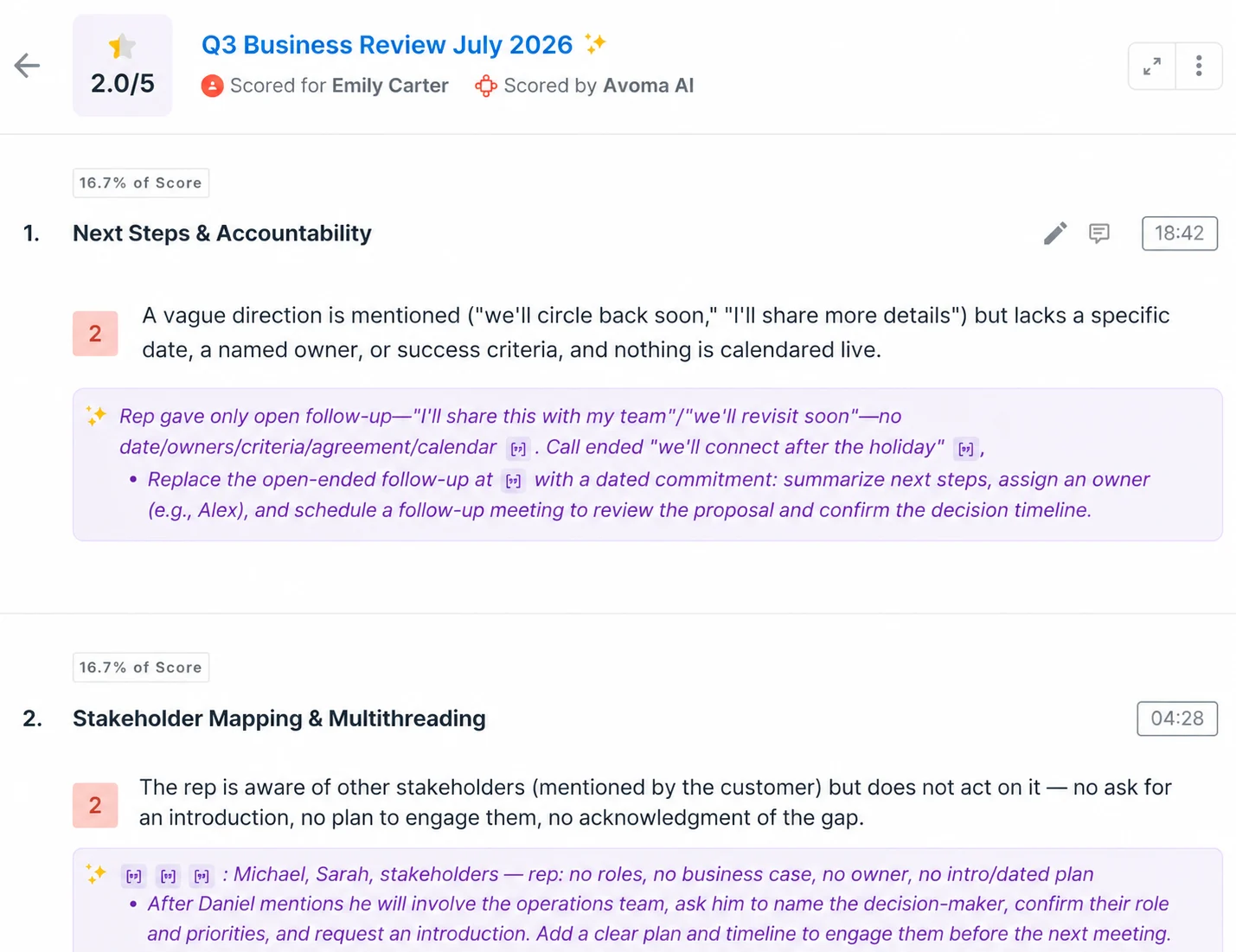
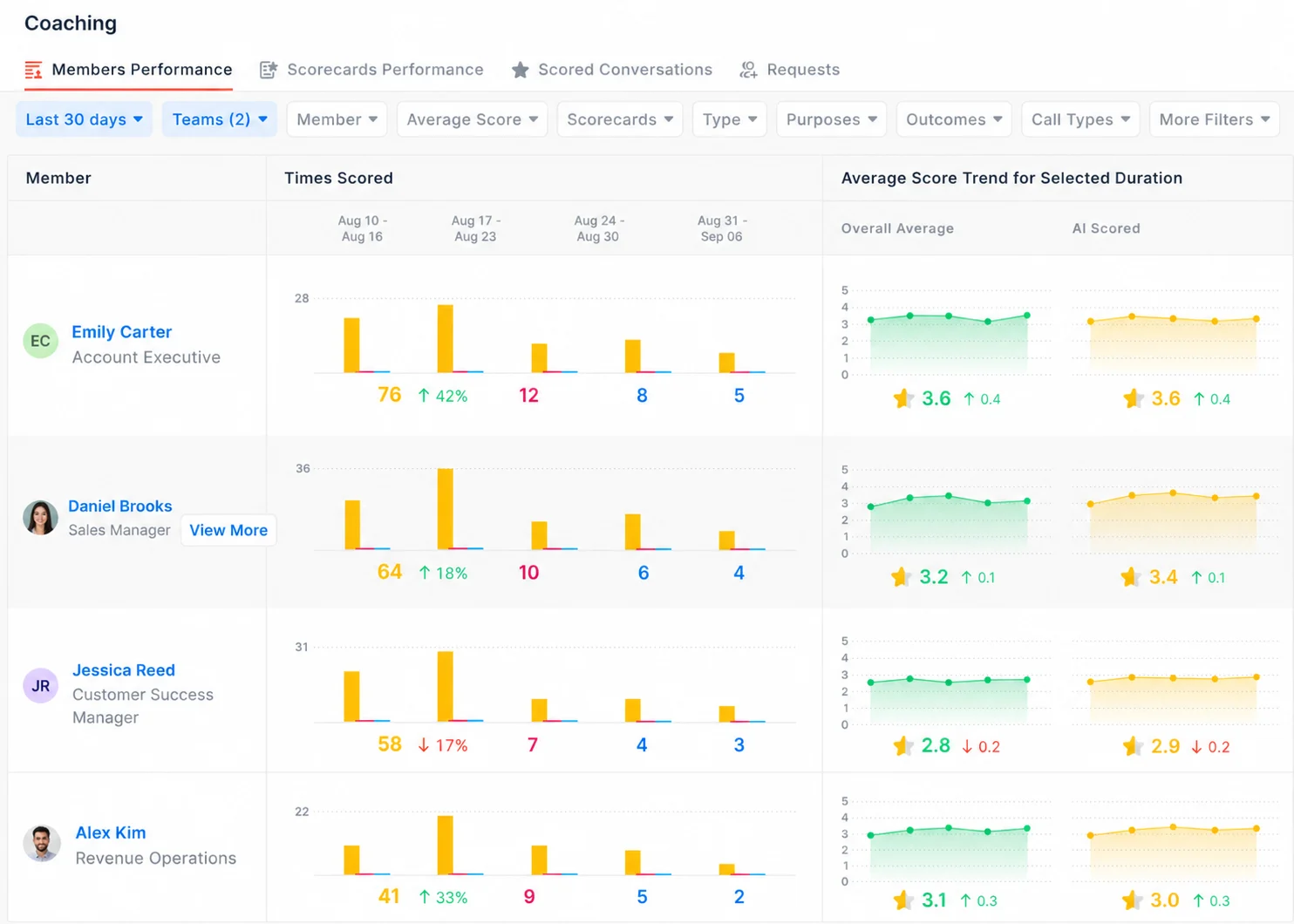
Each scored call also comes with coaching recommendations. Managers see how often each rep was scored and how scores trend over time.
Inspect deals and forecast the quarter
AI-detected risk alerts appear on each deal, on web and mobile, with the transcript evidence behind them.
Reps and managers submit forecasts in Avoma. They can track week-over-week changes in Commit and Best Case and see weighted pipeline by deal stage.
AI win-loss analysis reviews calls, meetings, and emails on closed deals to explain why they were won or lost. Smart Topics track subjects you define, such as competitor mentions, across recorded meetings.
Control access and handle follow-up
Admins set consent rules (Informed, Requested, or Required), org-wide recording policies, and privacy settings on each meeting. Scorecards, templates, and scoring history belong to the company account, so they stay when a manager leaves.
After the call, Avoma's AI agents draft follow-up emails and create tasks from action items.
2. Build custom workflows inside Avoma
You can shape Avoma around your own process without writing code:
- Note templates that apply themselves by meeting type, team, or workflow
- Deal methodologies like MEDDIC, MEDDPICC, BANT, SPIN, or your own framework, scoped by team or pipeline
- Rule-based automations that associate meetings with the right CRM records
- Shared prompt libraries for sales, customer success, and leadership
- Email templates with AI fields for follow-ups
- Slack alerts that post deal risk, forecast risk, or coaching recommendations to the channel you pick after meetings that match your filters (some alert types need an add-on)
- Zapier triggers that send Avoma events to tools like Asana or Monday.com
3. Ask questions with built-in AI
Ask Avoma answers questions about meetings, deals, and accounts inside Avoma. A manager can ask which deals haven't had a multi-stakeholder call, or which objections came up most in late-stage deals this quarter.
You can pin specific meetings, deals, or accounts as context before asking, so you know what each answer draws on.
4. Bring your own AI through MCP
Teams that already work in Claude or ChatGPT can connect them to Avoma through its MCP connector. Your team asks about real calls without exporting or pasting transcripts, and each person reaches only the meetings they can open in Avoma.
Example: A RevOps manager asks Claude, through the Avoma MCP connector, which of 10 open opportunities had no economic buyer identified in last month's discovery calls. Claude pulls the meeting notes and transcripts from Avoma, with nothing downloaded or pasted by hand.

Sales leaders and CS teams can run custom deal risk or feedback analysis the same way.
5. Build custom workflows using Avoma's API
Your engineers can send meetings, transcripts, notes, and scorecard results into the systems you already run through the Avoma API, like a data warehouse or an internal agent.
That lets you combine conversation data with product usage or support tickets. Webhooks can kick off your own workflows when meetings happen.
This is still a hybrid approach. Say a company builds its own coaching system with Claude, its own meeting recordings, CRM integrations, scoring logic, and reporting database. That's a build.
If the same company uses Avoma to capture and organize meetings, then builds a custom coaching app on Avoma's API, that's hybrid. The company builds only the custom analysis, on top of data Avoma already captures.
Your organization stays responsible for how external AI tools and internal systems handle the data they pull.
How to decide whether to build, buy, or combine AI for your revenue team
Start with the business process you want AI to support, then answer 7 questions:
- Is this a one-time task or a recurring workflow?
- What information does the AI need, and where is it stored?
- How many people will use the workflow?
- Do managers need consistent evaluations and historical reporting?
- Where will findings and actions be recorded?
- What data governance requirements apply?
- Who will maintain the workflow over time, and who takes over if they leave?
Then match your answers to an approach:
- Your existing AI tools meet the requirement: You have little reason to add another application.
- You need custom analysis for one team: Building may be the right call.
- You need shared conversation history, consistent workflows, and cross-team reporting: Purpose-built software is worth evaluating.
- You need all 3: Pair purpose-built software with your preferred AI tools.
Each answer comes back to where your team's conversation data lives: in one governed place, or in dozens of private chats.
Avoma records your customer conversations, scores them, and links them to deals. You can use that data in Avoma, in Claude or ChatGPT through MCP, and in your own systems through its API.
Explore Avoma's revenue intelligence to see how built-in workflows and your own AI tools can work from the same conversation data.
Frequently Asked Questions
Bundled AI is often enough for meeting summaries and follow-up drafts.
Sales coaching tends to need more: a shared scorecard applied to every call, scores managers can compare across reps, and history that shows whether a rep improves. Teams should check whether their bundled tool supports custom evaluation criteria and stores results for reporting before relying on it for coaching.
An MCP connector is an integration built on the Model Context Protocol, an open standard that lets AI assistants such as Claude and ChatGPT read data from and take actions in other applications.
For revenue teams, an MCP connector to a conversation intelligence platform lets an AI assistant query meeting transcripts, notes, and scorecards without users downloading and uploading files by hand.
It depends on the account and the organization's policies. A company-approved business or enterprise account with agreed data terms differs from a personal account outside company controls.
Sales transcripts often contain pricing, contract terms, and customer details. Before sharing call content, teams should confirm which AI tools are approved, which account types employees may use, and what the provider's data retention terms say. A pasted transcript also loses the access controls it had in the recording tool, so a meeting marked private there is no longer restricted.
A team where 1 or 2 people review calls can often cover its needs with Claude or ChatGPT. That holds when the workflow is limited in scope and trend reporting isn't required.
The trade-off grows with headcount. Once several managers coach reps, or leadership wants call quality and deal risk trends over time, the team needs shared criteria, stored results, and someone to maintain the workflow. Copying transcripts in and results out by hand also stops keeping up at that point.
According to Avoma's help center, the Avoma account needs an Organization or Enterprise plan, or the API Access add-on.
The Claude workspace needs a paid plan that supports custom connectors, and the person adding the connector needs the Owner role in the Claude organization. Requirements can change, so teams should confirm current details in Avoma's help center before setup.





What's stopping you from turning every conversation into actionable insights?


